GS1 DataBar Expanded Stacked: Features and Configuration in FastReport .NET
GS1 DataBar Expanded Stacked is a multi-line barcode for products that require more information than a standard GTIN. It allows encoding additional data such as expiration date, weight, and batch number, placing them in a compact label area. This article will explore the data supported by the symbol, how it is read, and how the Segments parameter affects the barcode shape in FastReport .NET.
What is GS1 DataBar Expanded Stacked
GS1 DataBar Expanded Stacked is a multi-line version of GS1 DataBar Expanded. It is designed for cases where an extended single-line barcode does not fit horizontally. Data is distributed across multiple lines, allowing the symbol to be placed on narrow labels or packages with limited space.
Depending on the available space, the barcode can be relatively wide and short or narrower and taller. According to GS1 data, the symbol can hold up to 74 numeric or 41 alphanumeric characters; in the Stacked version, data can be arranged in a maximum of 11 lines.
What Data Can Be Encoded
Unlike GS1 DataBar Omnidirectional and Limited, which are primarily designed for GTIN, the Expanded Stacked version supports GS1 Application Identifiers (AI). These indicate how to interpret the following data.
A single barcode can encode:
- GTIN — AI (01)
- Net weight — for example, AI (310x) for kilograms or AI (320x) for pounds
- Production date or expiration date — AI (11), (15), or (17), depending on the date value
- Batch number — AI (10)
- Serial number — AI (21)
- Price — for example, AI (392x)
The set of applied AIs depends on the task and specific product labeling rules. GS1 DataBar Expanded Stacked is used particularly for additional information about fresh products, such as weight and expiration date.
Scanning at the Checkout
GS1 DataBar Expanded Stacked is designed for scanning with multi-plane scanners in retail. However, readability depends on equipment compatibility and configuration: not every scanner automatically recognizes this symbol type.
Barcode lines are separated by special patterns. These help the scanner recognize the symbol structure and correctly combine data from different lines. According to specifications, the separator pattern height is 3 modules, and the line height is 34 modules.
The symbol uses a control value calculated using the modulo 211 algorithm. This helps detect decoding errors but does not guarantee reading of damaged barcodes in all cases.
Examples of Data for Encoding
Below are two examples of strings with application identifiers.
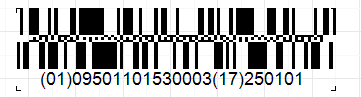
Short code: (01)09501101530003(17)250101
- AI (01) — product GTIN
- AI (17) — expiration date: January 1, 2025
In this example, there is little data, so the barcode may occupy fewer lines than a longer code. The actual layout depends on segment settings and available space.
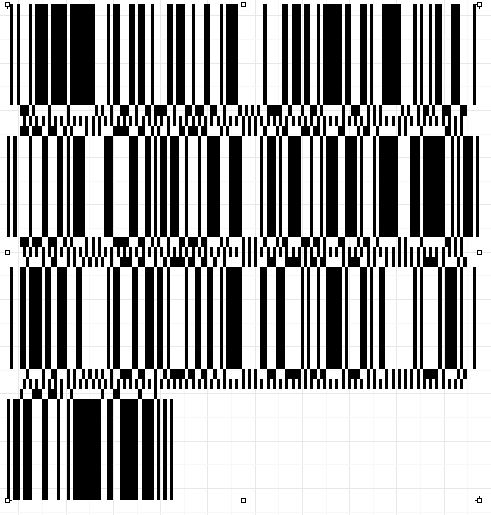
Long (complex) code: (01)08684225231863(3103)000000(17)251230(251)TR03008228992(7007)251215
- AI (01) — GTIN
- AI (3103) — net weight in kilograms with three decimal places
- AI (17) — expiration date: December 30, 2025
- AI (251) — identifier related to the original object or component
- AI (7007) — date and time of harvest or production
The more data that needs to be encoded, the more space may be required. If the symbol width is limited, data will be distributed across more lines.
Configuring Segments in FastReport .NET
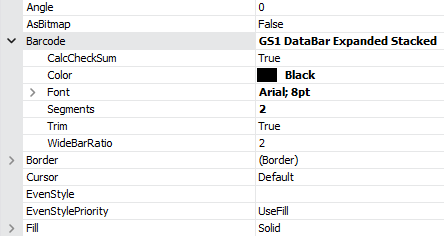
In FastReport .NET, the Segments parameter is responsible for dividing the symbol into lines. It determines the number of data segment pairs in one horizontal line and affects the barcode's width-to-height ratio.
-
Segments = 2— minimum value: the barcode is narrower and typically taller, as data is distributed across more lines -
Segments = 4, 6, 8...— as the value increases, the barcode becomes wider, and the number of lines usually decreases -
Segments = 20— maximum width for the multi-line version; with an appropriate amount of data, the symbol may fit in a single line
In this case, Segments must be an even number from 2 to 20. These values correspond to the width range of GS1 DataBar Expanded Stacked specified in the specification.
Conclusion
GS1 DataBar Expanded Stacked helps place not only the GTIN but also additional information on a product label — for example, net weight, expiration date, and batch number. The multi-line structure makes it convenient for narrow labels, while the Segments setting in FastReport .NET allows adjusting the desired width-to-height ratio. When preparing for printing, it is important to verify the correctness of the data and ensure that the scanner being used supports this barcode type.