FastReport Mono
You've probably heard that our team is working on porting the FastReport.NET to the Mono platform - we told this at our conference, held last year in Rostov-on-Don. Then followed a long silence, and now we are ready to show where do we go.
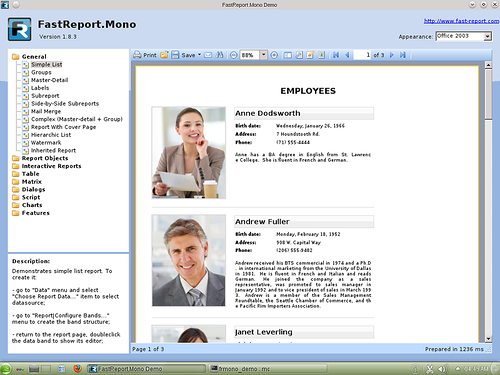
The main feature of this demo is that it can work in Windows as well as in Linux. In order to run it under Windows, simply unzip the archive to any directory and run Demo.exe.
Running the demo under Linux is somewhat more complicated.
To get started, make sure you have installed the necessary libraries. The easiest way to install of development environment MonoDevelop with required libraries. To properly generate reports that contain built-in scripts, you need to install an additional package "mono-gmcs".
This demo assumes that the font files are stored in the /usr/share/fonts/truetype directory. This is true for all modern versions of Linux. You should set an environment variable (FONTDIR) when the font files are located in another directory.
Use following command: export FONTDIR = /my/fonts/path where /my/fonts/path is the path to the font directory. An interesting effect is observed when testing FastReport.Momo on MacOS X - a very long launching. However, after the launch of the FastReport.Momo it very quickly generates reports. Do not forget to set the font's path under MacOS X using an FONTDIR environment variable. Otherwise many exports will wont work.
Notices, bugreports, and issues can be left on this blog, or send to the support@fast-report.com.