So betten Sie ein Bild in einen Bericht ein
In our previous entry you have already seen an example of a simple report and now it is time to create a little more complicated report with embedded picture.
We created single band, then put PictureObject on it and load picture into it. After that we have added two memo fields: еру first one for header text and the second one for semi-transparent label on the picure. So we got following template:
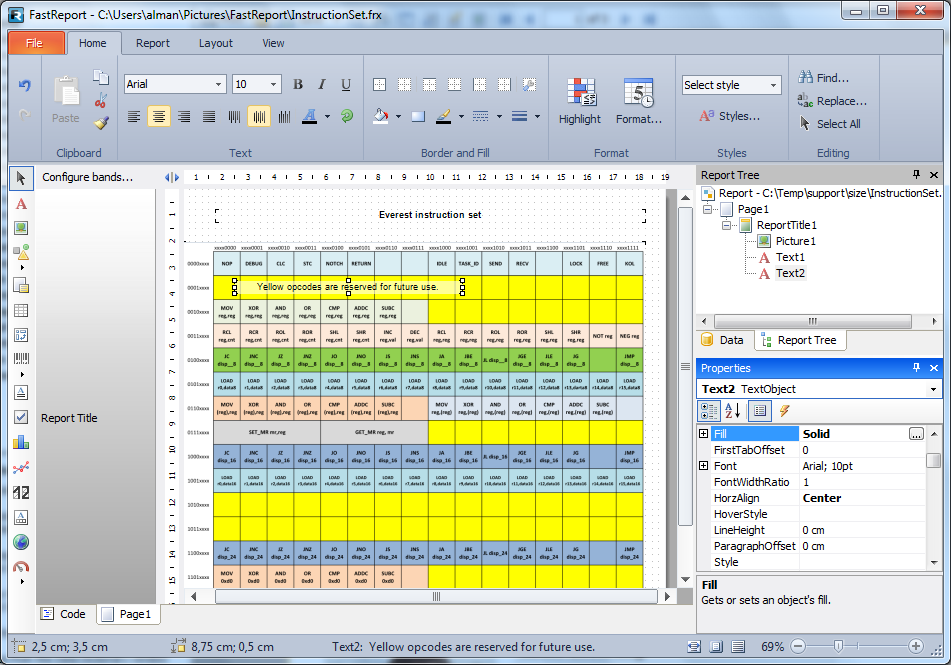
The table you see on the screenshot above is a PNG-image which is embedded into report template. When we save this template to the FRX file, we will receive following XML.
<?xml version="1.0" encoding="utf-8"?>
<Report ScriptLanguage="CSharp" ReportInfo.Created="05/21/2015 00:40:44" ReportInfo.Modified="05/21/2015 02:32:15" ReportInfo.CreatorVersion="1.0.0.0">
 <Dictionary/>
 <ReportPage Name="Page1">
 <ReportTitleBand Name="ReportTitle1" Width="718.2" Height="661.5">
 <PictureObject Name="Picture1" Left="18.9" Top="75.6" Width="670.95" Height="576.45" Image="iVBORw0KGgoAAAANSUhEUgAABHUAAAPTCAIAAACxEqIHAAAAAXNSR0IArs4c6QAAAAg=="/>
 <TextObject Name="Text1" Left="66.15" Top="28.35" Width="623.7" Height="18.9" Text="Everest instruction set" HorzAlign="Center" Font="Arial, 10pt, style=Bold"/>
 <TextObject Name="Text2" Left="94.5" Top="132.3" Width="330.75" Height="18.9" Border.ShadowColor="116, 0, 0, 0" Fill.Color="149, 255, 255, 255" Text="Yellow opcodes are reserved for future use." HorzAlign="Center" VertAlign="Center"/>
 </ReportTitleBand>
 </ReportPage>
</Report>
Please note that this XML is an incorrect sample - I removed lot of data from the Image property of PictureObject. Real picture from my template consists of a line with 184770 characters. Original picture takes 138499 bytes. So the size of embedded picture grows for about 33%.
The following picture explains these sizes - eve 180% zoom keep qulity of embedded picture.
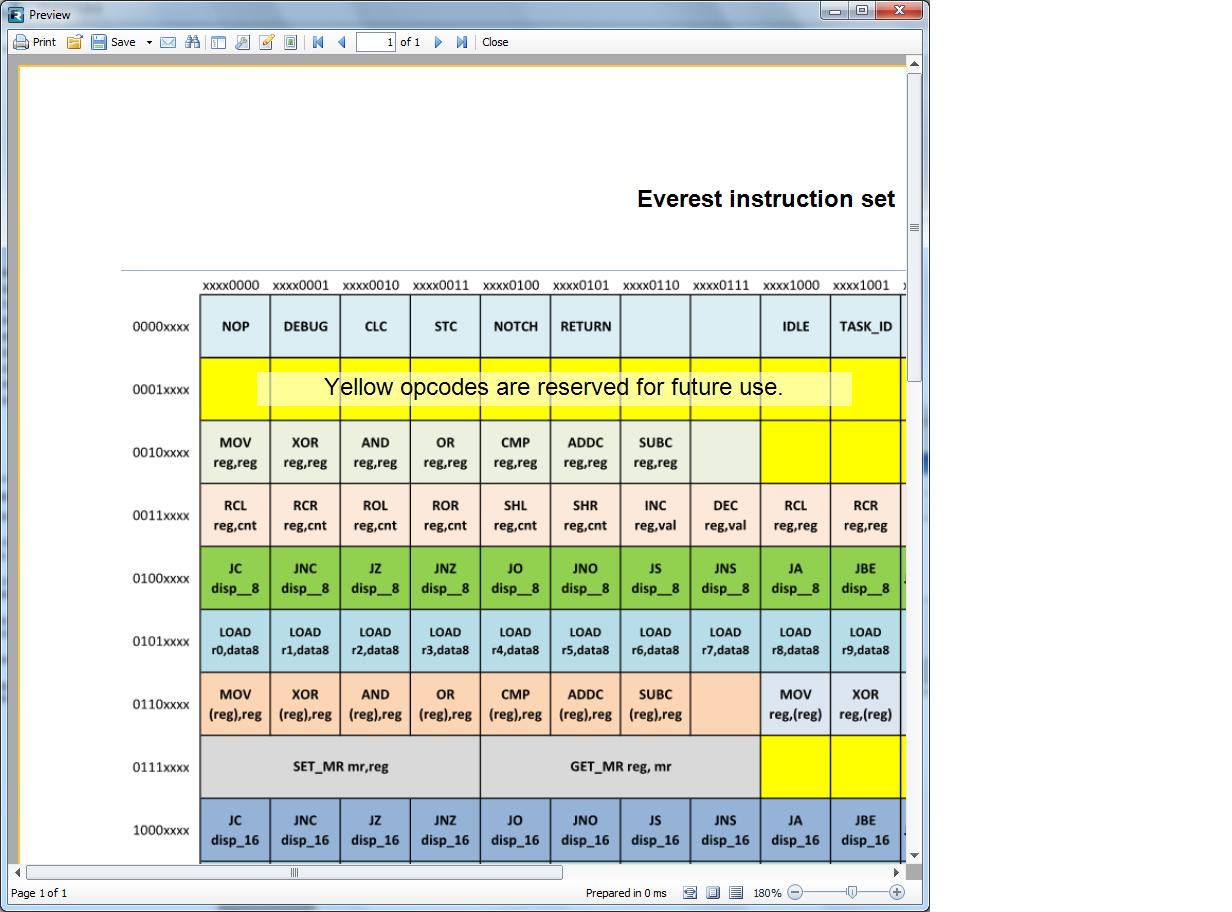
The size of the prepared report is a bit smaller than its template because of the gzip.
Here is source of prepared report. Note that bitmap data is shrinked from this example to keep a smaller size of this article:
<?xml version="1.0" encoding="utf-8"?>
<preparedreport>
 <pages>
 <page1>
 <b1>
 <p1 ImageIndex="0"/>
 <t1/>
 <t2/>
 </b1>
 </page1>
 </pages>
 <sourcepages>
 <ReportPage Name="Page1">
 <ReportTitleBand Name="ReportTitle1" Width="718.2" Height="661.5">
 <PictureObject Name="Picture1" Left="18.9" Top="75.6" Width="670.95" Height="576.45"/>
 <TextObject Name="Text1" Left="66.15" Top="28.35" Width="623.7" Height="18.9" Text="Everest instruction set" HorzAlign="Center" Font="Arial, 10pt, style=Bold"/>
 <TextObject Name="Text2" Left="94.5" Top="132.3" Width="330.75" Height="18.9" Border.ShadowColor="116, 0, 0, 0" Fill.Color="149, 255, 255, 255" Text="Yellow opcodes are reserved for future use." HorzAlign="Center" VertAlign="Center"/>
 </ReportTitleBand>
 </ReportPage>
 </sourcepages>
 <dictionary>
 <b1 name="Page0.ReportTitle1"/>
 <p1 name="Page0.Picture1"/>
 <page1 name="Page0"/>
 <t1 name="Page0.Text1"/>
 <t2 name="Page0.Text2"/>
 </dictionary>
 <bookmarks/>
 <outline/>
 <blobstore>
 <item Stream="iVBORw0KGgoAAAANSUhEUgAABHUAAAPTCAIAAACxEqIHAAAAAXNSR0IArs4c6QAAAARnQU1BAACxjwv8YQUAAAAJcEhZcwAADr4AAA6+AepCscg=="/>
 </blobstore>
</preparedreport>
Let's carefully look into this sample. We have a static template with the entire data embedded into it. That's why the <pages> section does not store any real data but store refrences. Refferenced objects are defined in other sections, so we have a single page with single band with picture and two memo fields as XML code above defines.
We are using dictionary for getting the object properties via references. For example, reference to picture object encoded by <p1> element. Btw, only the picture object of this sample has attribute.
To getting picture properties, we looking in <dictionary> section for same element - <p1 name="Page0.Picture1"/>
Here is trick of reference encoding - reference to template object is encoded in "name" attribute as string with two names shared by dot. Here is simple rule - name after dot refers to an object with same name in <sourcepages> section within the page, which name generated as "second" page, F.e, Page0 refer to Page1, Page1refer to Page2, Page2 refer to Page3, and so on.
Now it is time to look onto <PictureObject>. Did you note that the Image attribute disappear in prepared report? This property not disappear. It is transformed to ImageIndex attribute of <p1> object within <pages> section. Bitmap image data are moved to <blobstroe> section into <item> element as "Stream" attribute,. Value of ImagweIndex elemet is position of <item> element whitin <blobstroe> section.
So this article describes base principles of report formats.
Stay tuned for continuation of the topic. In the next article we will look into some report element properties.