How to install FastReport Business Graphics .NET
This article shows how to install FastReport Business Graphics .NET on your computer and how to add Business Graphics components in Visual Studio.
First, download the FastReport Business Graphics installer. You will find it in your user panel.
Agree to the terms of the license agreement and enter your serial number, then choose the installation location. After this, FR Business Graphics will be installed successfully.


Today FastReport Business Graphics supports .NET Framework 4.x, but we plan to add support for other frameworks in the future. Let’s look at how you can add Business Graphics components to your application.
Let’s create a new WinForms application.

Create a new tab in the toolbox, and click on “Choose items…” in its context menu:
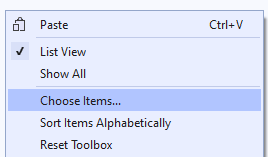
In the menu, click on “Browse…” and select the FastReportBG.dll file in the installation folder:

After that, FastReport Business Graphics components will appear in the list of components.

Select all elements related to FastReport Business Graphics and click “Ok”. After that, all the necessary elements will be added to the component panel, and you will be able to add them to the form.

In addition, add FastReportBG.dll to the list of dependencies. If you purchased the FastReport Business Graphics edition with the source code, it will be located in the FastReport.BG installation folder, and to build it you need to open the FastReport.BG.csproj project.
At this stage, you have completed all the steps required to start working with FastReport Business Graphics. Enjoy!
