Calling "FastReport COM/ActiveX" from C# applications on 64-bit platforms.
Calling "FastReport COM/ActiveX" from C# applications on 64-bit platforms.
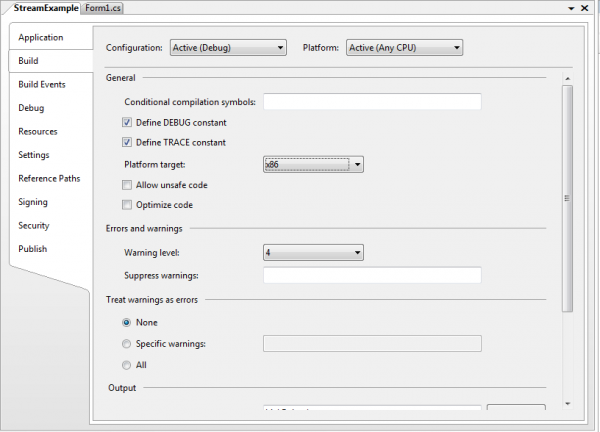
Simple solution: It is necessary to set 32-bit platform in project options. Here is an example (note: platform target is x86):
Perfect solution: Download demo version of FastReport.NET.
Use this tool for conversion FR3 templates to FRX temaplates: https://fast-report.com/pbc_download/fr3tofrx.exe
If you have VCL version, then you can use following tip: How to convert fr3 to frx.
Finally, you should manually create data source objects, and assign them to report objects.
Why second solution is perfect? Because your will get fully managed solution without additional COM wrappers - FastReport Studio is a 32-bit COM server, which called from a 64-bit application that is not good for performance. In addition, most of the attractive features of managed code can not be used when working through COM technology.
In other words - if your choice is a managed application, it is better to use reporting tools based on managed code - you will save a lot of time and nerves.
