How to use “UnlimitedHeight” and “UnlimitedWidth” properties of a report page
The new version FastReport.Net 2016.30.1 represents a very interesting feature – elongating reports. If you use a matrix report or dynamic tables, they likely do not fit the width or height of your page. Therefore, it is needed to “break” a table and move it to the next page. It spoils the appearance of documents and makes them difficult to read. Now the report can consist of a single page. It will elongate the page to distribute all the bands in total with no breaks on it. Such a full - length report can be printed on A3 paper sheet or on A4 paper sheet. Table editor “MS Excel” is the best to export wide reports. The entire report can be placed on a single sheet of paper.
Let us take a look at solving the problem of “growing” tables in the past.
The table in the picture below does not fit the page in width:

A part of the table has moved to the new page. By default, in such a way FastReport.Net deals with "oversized" tables. Of course, a part of a table moved to the next page is not the best solution. Therefore, objects “Table” and “Matrix” have a property “Layout”, for which it is possible to set a value “wrapped”.
Let us illustrate this on the table shown above. The following picture introduces the difference between two tables:

The data that did not fit in width has been moved down on the same page. It is much more convenient than the “page break”.
Now, please, look at the same example with matrix:
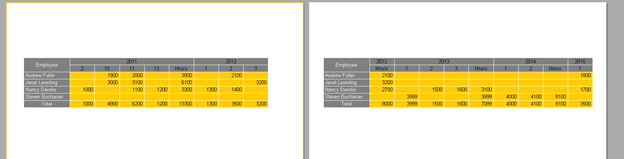
The following picture introduces the appearance of matrix if you set a value “wrapped” for “Layout”:
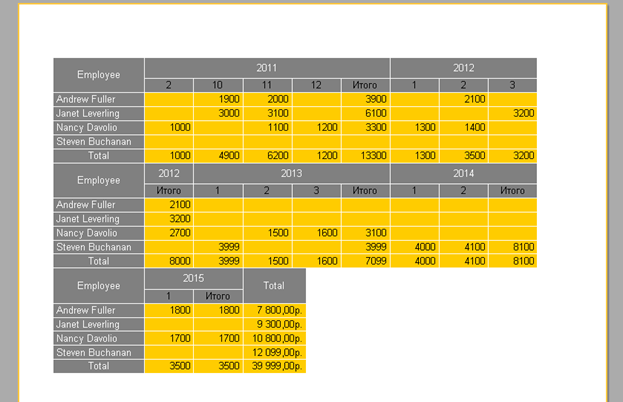
Now FastReport.Net allows creating tables and matrixes of any width and height. Properties “UnlimitedHeight” and “UnlimitedWidth” were added to the report page.
If you set their value to “true”, the page will be able to elongate with the report objects.
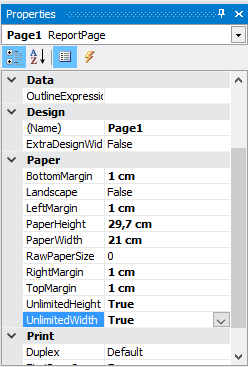
Enable these properties for a report with a wide table:

Let us take a look at the matrix:

Now, let us export the matrix to “Excel”:

The picture below represents a long table:
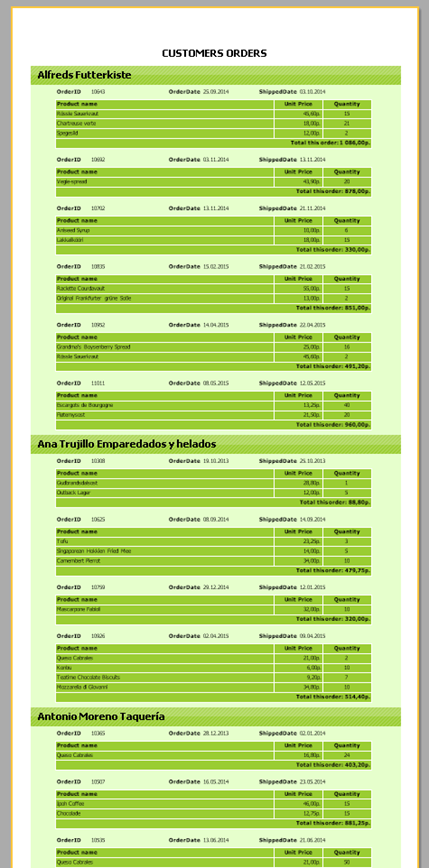
In such a way, FastReport.Net now allows creating reports with "adjustable" pages that are convenient to be printed on large paper sizes or for exporting to a table editor. Also, this mode can be useful for web - reports, where the page size is not important.
