Tabs in WebReport
We can use tabs to view multiple reports in WebReport in version FastReport.NET 2013.4 and newer.
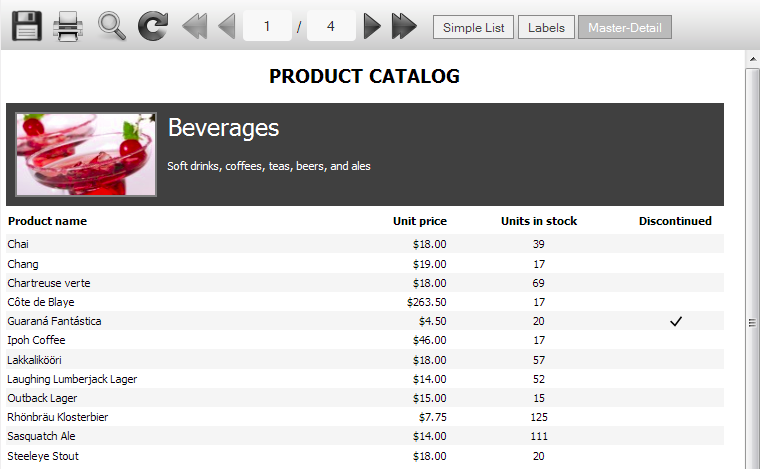
Tabs can be useful for viewing many reports with additional information. Each report in tab has own navigation and may be attached to any data source. Saving in different formats is performed for each tab.
We have plans to implement FastReport.NET for open the detailed report in a separate tab by clicking on the object page. Also we will add the ability to close unnecessary tabs.
Tabs can be added directly in the application code, for example:
WebReport webReport = new WebReport();
webReport.Report.RegisterData(dataSet, "NorthWind");
webReport.Report.Load(report_path + "Simple List.frx");
webReport.CurrentTab.Name = "Simple List";
// tab 2
Report report2 = new Report();
report2.RegisterData(dataSet, "NorthWind");
report2.Load(report_path + "Labels.frx");
webReport.AddTab(report2, "Labels");
// tab 3
Report report3 = new Report();
report3.RegisterData(dataSet, "NorthWind");
report3.Load(report_path + "Master-Detail.frx");
webReport.AddTab(report3, "Master-Detail");
A property “webReport.CurrentTab” needs for access to the current tab, for example: “webReport.CurrentTab.Report”. By default, the first tab is available. In each of the tabs we have next available properties: “Report” – report object, “Name” – tab name. The name of the tab will be taken from the properties of report or report file name if the “Name” property is not specified.
The collection of tabs "webReport.Tabs" is also available. These can be used to refer to the tab by its index, for example: webReport.Tabs [0]. Name.
WebReport.AddTab method adds a new tab. We can use any declaration from next:
// an adding of report object
public ReportTab AddTab(Report report);
// an adding of report object with its name
public ReportTab AddTab(Report report, string name);
// an adding of prepared report object with its name (reportDone = true)
public ReportTab AddTab(Report report, string name, bool reportDone);
Last call declaration can add any prepared report.
An example of adding some prepared reports:
webReport.Tabs.Clear();
string s = this.Server.MapPath("~/App_Data/Prepared.fpx");
// first
Report firstReport = new Report();
firstReport.LoadPrepared(s);
webReport.AddTab(firstReport, "First tab", true);
// second
Report secondReport = new Report();
secondReport.LoadPrepared(s);
webReport.AddTab(secondReport, "Second tab", true);
In the near future we will add the display settings for tabs and an implementation of interactive reports.
Thank you for attention!