How to pass parameter into report through URL
Working with reports on the Internet, there is a need to transmit the values of any parameters. This, for example, can be data for filtering lists or customer information. It would be convenient to pass parameters using the URL (Universal Resource Locator) when you call the web form with the report. It is quite easy to do this.
Let's consider the simplest example. In the report template, there are two parameters: Param1 and Param2 of type string:
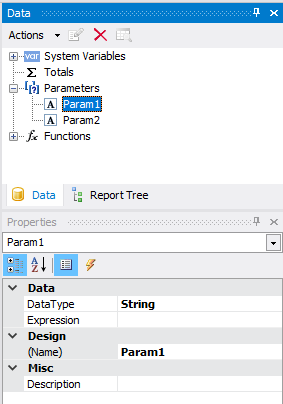
You need to pass the values for these parameters using the URL.
Create a web application ASP.Net WebForms. We place a WebReport component on a page. Add the created report template to the project. Right-click on the folder App_Data and select «Add-> Existing Item ...». Then we find the report file on the hard disk. Now go to the C # code page. First of all, we add libraries:
1 2 |
using FastReport.Web; using FastReport; |
I used the Load page event, because at this stage the report is not yet displayed:
1 2 3 4 5 6 7 8 9 10 11 12 13 14 15 16 17 18 |
namespace URLParams { public partial class About : Page { protected void Page_Load(object sender, EventArgs e) { //Get parameters from URL string param1 = Request.QueryString["param1"]; string param2 = Request.QueryString["param2"]; //Load report fil into WebReport object WebReport1.ReportFile = "App_Data/URLParams.frx"; //Set value to report parameters WebReport1.Report.SetParameterValue("Param1", param1); WebReport1.Report.SetParameterValue("Param2", param2); } } } |
Note that the parameter name exactly matches the parameter name in the report template:
1 |
WebReport1.Report.SetParameterValue("Param1", param1);
|
The URL looks like this:
http://localhost:51838/About?param1=Hello%20World!¶m2=Good%20job!
The Request.QueryString(); function finds the parameter by name and returns its value.
The second option, without saving the report template in the project:
1 2 3 4 5 6 7 8 9 10 |
protected void Page_Load(object sender, EventArgs e) { string param1 = Request.QueryString["param1"]; string param2 = Request.QueryString["param2"]; Report report = new Report(); report.Load("J:/Program Files (x86)/FastReports/FastReport.Net/Demos/Reports/URLParams.frx"); report.SetParameterValue("Param1", param1); report.SetParameterValue("Param2", param2); WebReport1.Report = report; } |
Here, we create a report object, load a template into it, and assign parameters. After that, we assign the report object to the web report object. Forgive me for the tautology. At the same time, make sure that the property of the ReportResourceString WebReport is empty.
Both methods lead to the same result:
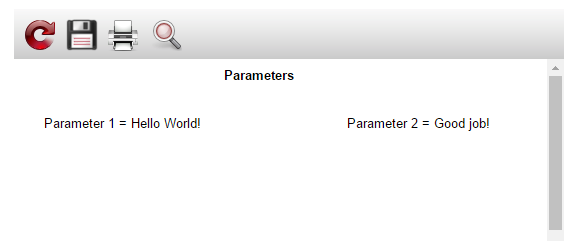
Thus, just a few lines of code allow you to use parameters passed in the URL.
