Connecting to Elasticsearch
Now FastReport .NET, Core, Mono, and OpenSource products allow connecting to Elasticsearch. Elasticsearch is a scalable utility program for full-text search and analytics, which allows storing, searching, and analyzing large volumes of data quickly and in real-time mode.
You may obtain data in JSON format from Elasticsearch. FastReport .NET has a connection to JSON and it is rather convenient to use data in this format. That is why this format will be used as a middleware between FastReport .NET and Elasticsearch.
Important notice! FastReport implements only connecting to Elasticsearch as a source of data, without the opportunity to search in the data stored in it.
To create a connection to Elasticsearch, click the Data tab in the Designer and select Add data source. In the window that appears click New connection. To connect, you will need endpoint Elasticsearch and indication of the titles for data access, for example, authorization data (there is a grid for that below). If the data access is granted, a list of tables will appear after clicking the Next button. For successful connection, put a tick on the left of the table title. Then the connection setting will be complete.
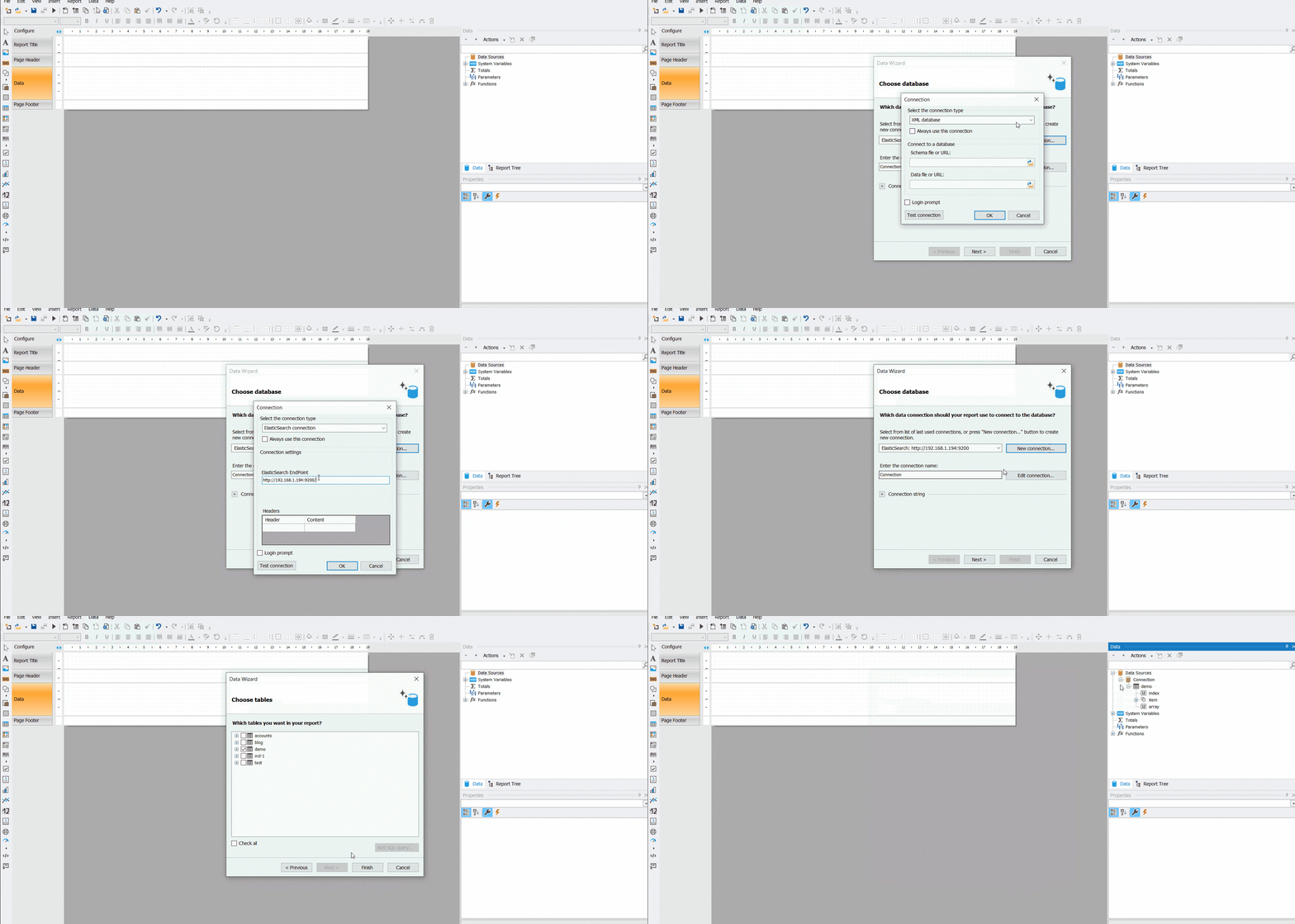
After connecting the data source, you have to connect a band to it.

As a result, the report will use data from the created connection to Elasticsearch.

If you need to select data for connection, you may make a GET enquiry and use it as a JSON connection string. In the example below you may see a search for records containing the word Bruno in the name field and are located in the demo index (these are the names of the table in Elasticsearch). Also, if there are over 10 records, you will have to add the size parameter and indicate the necessary number of records in it.
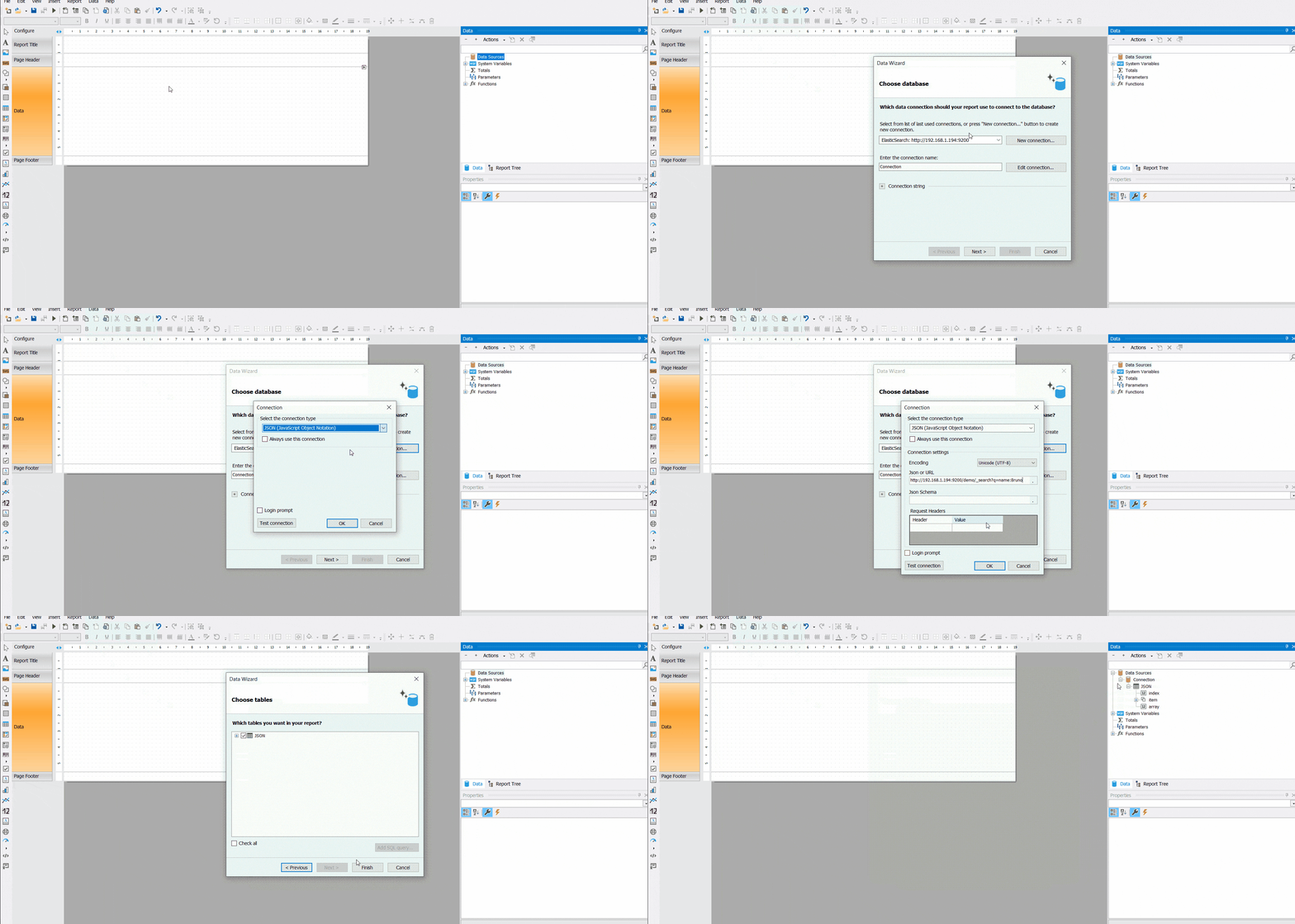
In the report you will also have to indicate the name of the data source in the DataSource band property; then the data will be extracted from the source to the report.


An example of connecting to Elasticsearch from the code:
// create ESDataSourceConnectionStringBuilder instance
ESDataSourceConnectionStringBuilder builder = new ESDataSourceConnectionStringBuilder();
// set Elasticsearh end point
builder.EndPoint = "http://192.168.1.194:9200/";
// create ESDataSourceConnection instance
var connection = new ESDataSourceConnection();
//set connection string
connection.ConnectionString = builder.ConnectionString;
// init all table
connection.CreateAllTables();
// set name connection
connection.Name = "NewConnection";
// create Report instance
var report = new Report();
// add connection to report
report.Dictionary.Connections.Add(connection);
// set connection show
connection.Enabled = true;
// choose table with name "demo" and connect it to the report
foreach(TableDataSource table in connection.Tables)
{
 if (table.Name == "demo")
 table.Enabled = true;
}
As a result of executing this code, we will be able to see a new “demo” table in the Designer in the list of available connections.

Now you know more about the opportunities for creating a connection to the Elasticsearch database. If you need to select data, you may use the connection to JSON.