How to sort the data in the report FastReport .NET
Sorting data is one of the most important data processing tools. We can say, it is the basis of the analysis. Analysing chaotic output data is almost impossible. Therefore, sorting provides all the tools that work with data. This also applies to reporting tools. After all, the data source may provide the report data is not sorted, or sorted, but not in the required field, not in the order.
The documentation for FastReport .NET outlines two ways to sort: sorting group values, sorting data in the Data band.
The first type of sorting is available to us when we create a group, namely when setting up the Group Headline band. When you choose the field you're going to group on, you can sort it right away.
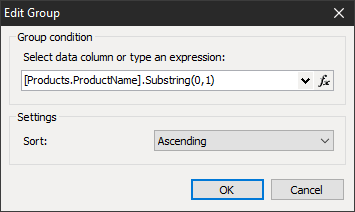
There are three sorting options available: no sorting, ascending, descending.
But if we talk about sorting basic data in the data bin, we can access more advanced sorting - three fields at once, and for each of them you can choose the order of sorting.
To call a sorting editor, you need to click the band's header twice on the page template.
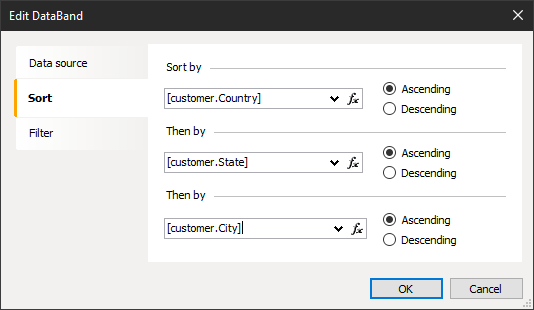
Despite the user-friendly interface, this tool has one significant drawback. To be precise it can sort only three fields. However, some of the tables have a variety of fields, and you may need to sort by more than 3 fields.
You can bypass this restriction by sorting the data in the source using the query. You can do this either by creating a data source or by a source you've already created, directly for the desired table.
In the first case, we're just writing a request to get the data in the right order. The second case is the same, but in a data source that has already been created.
In the data tree, choose the right table. In the property inspector, we ask SelectCommand.
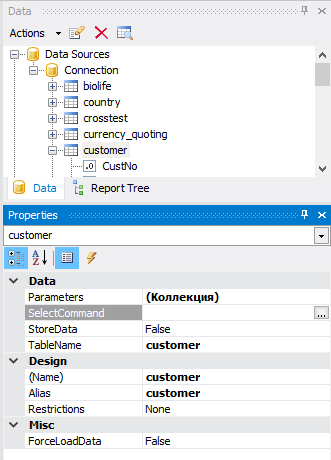
It is alled by the wizard to create an SQL query. You can enter a query manually or use the Query Builder. So you can sort of arbitrary number of fields:
1 |
SELECT * FROM customer ORDER BY Country, City, State, CustNo, Company
|
When you create a data source, you may not be aware that you need a certain order data. But you can always add a request in an existing data source. However, this method does not work with non-SQL databases.
