How to use RFID tags in FastReport .NET

The RFID tag is an alternative to identifying goods using barcodes. There is an exception that RFID tags use radio signals, which allows the scanning of large batches of goods in short intervals of time. Also, tags are often used to identify employees in companies.
The tag contains 4 data banks:
1. The reserved data bank contains two passwords (access and kill). With the first one, it is possible to control opening and closing access to some banks or parts of the memory. The second one is required for permanent disconnection or reuse (if supported by the tag). Each password must be no longer than 32 bits.
2. Electronic product code bank.
3. Tag ID bank.
4. User data bank.
All banks except the first one can have a different volume or they can be blocked by suppliers; all of the mentioned are described in the characteristics of the tag. The data formatting standards for these banks are described in this document.
For local use, one can use any data formatting convenient to the user to work with them.
Label in FastReport .NET is represented as a report object. To edit it, you need to double-click on the object located on the report page in the designer.
The editor is divided into tabs, each containing properties for a specific memory bank and one tab with other label options.
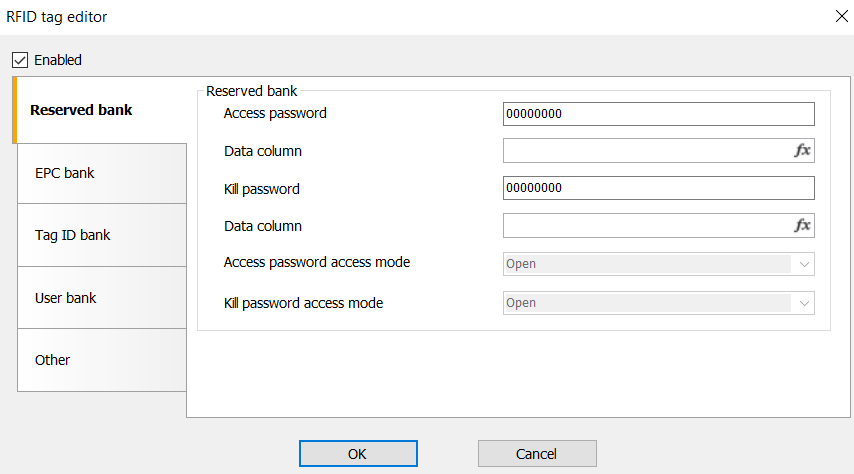
In the tabs of banks, you can enter static data in the fields with their names. Or you can use the data column from the data sources below. But for correct work of data substitution from a source, there must be only one data bank on the page. It is this band that will use the data source.
In the reserved data bank, passwords are written only as hexadecimal numbers and 8 characters in length. Also, without a set access password (with a non-zero value), the access mode control will not work. In all other banks, you can choose to write data in either hexadecimal or ASCII-encoded string format.
In addition to these fields, there are other settings. For more details, see the documentation for the ZPL format at the following link.
RFID tags can be programmed by some Zebra printers, so in addition to the RFID tag object itself, their export to ZPL has been added.
Note: For correct export, the RFID tag object must be in a single quantity on the page.
A new page object, RFID tag at FastReport .NET, allows users to use the library to create labels or cards without third-party RFID tag encoding software.
