Handling of PreviewControl.OnPrint and .OnExport events
In FastReport 2019.4 added the ability to subscribe to PreviewControl.OnPrint and PreviewControl.OnExport events, which are called directly when the corresponding buttons are pressed.
When viewing a report, a viewer is called with a toolbar that has elements such as a print button and a drop-down list with report exports. Selecting any item in the list will trigger the OnExport event, and pressing the Print button will trigger OnPrint. Let's take an example and see how we can use these events in practice.
You can use the standard handler for these events, which is created for the visual component of PreviewControl:
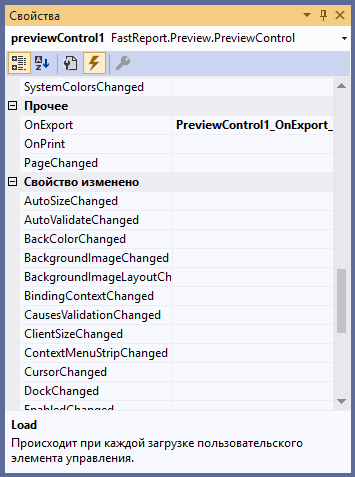
In this case you just add the necessary actions to the handler.
But if you add the PreviewControl component in the application code, you will have to sign your own handler for the event. For example, your handler may send you an export or print event alert. This could be, for example, a record in a database. Let us consider this example:
1 2 3 4 5 6 7 8 9 10 11 12 13 14 15 16 17 18 19 20 21 22 23 24 25 |
private void Button1_Click(object sender, EventArgs e) { //create report Report report = new Report(); //Load report report.Load("App_Data/Master-Detail.frx"); //create data source DataSet data = new DataSet(); //load data data.ReadXml("C:\\Program Files (x86)\\FastReports\\FastReport.Net\\Demos\\Reports\\nwind.xml"); //register data report.RegisterData(data); //create preview object var prev = new PreviewControl(); //add preview into the form this.Controls.Add(prev); prev.Dock = DockStyle.Fill; prev.BringToFront(); //subscribe to the event prev.OnExport+= new System.EventHandler<PreviewControl.ExportEventArgs>(ExportAction); //assign preview control to the report report.Preview = prev; //Show the report report.Show(); } |
After creating the report object and registering data in it, we create a PreviewControl, subscribe to the OnExport event our event handler, which we will implement below. Then we assign the PreviewControl object to the preview report. And now we implement a custom event handler for the OnExport event:
1 2 3 4 5 6 7 8 9 |
public void ExportAction(object sender, PreviewControl.ExportEventArgs e) { SqlConnection conn = new SqlConnection(@"Data Source=.\SQLEXPRESS;Initial Catalog=usersdb;Integrated Security=True"); SqlCommand command = new SqlCommand("insert into dbo.Status (ReportName, ExportType, ExportDate) Vales ('" + Path.GetFileNameWithoutExtension(e.Report.FileName) + "', '"+ e.Export.BaseName +"', '" + DateTime.Now + "')"); command.Connection = conn; conn.Open(); command.ExecuteNonQuery(); conn.Close(); } |
In this method, we record information about the export event in a database, with the report name, export type and transaction date. This is just one possible example of how to use this event. You can, for example, implement sending an email on this event, or saving an export file to a specific folder.
The OnPrint event is handled in the same way.
These two events are the most frequent operations on reports when viewed, so many people would like to automate their custom operations on the event. Now it is possible, it is easy to take information about the report, export or print settings from event arguments and dispose of it to create your own, additional operations.
