Adding pages from another report to FastReport .NET

The latest update in FastReport .NET allows you to add pages from other reports to the developed one. This will help you work with reports faster. Before you would need to merge several files or redo the report manually. To add a page, open the File menu and select Open Page.
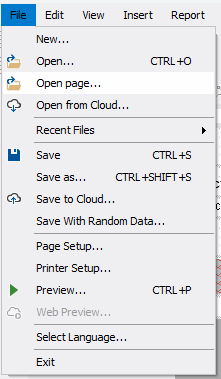
You will see a file selection dialog, similar to the dialog when a report is loaded in the usual way. After selection, you will see a window with a list of all report pages, dialog forms, and a preview of the selected page. Pages are displayed in the same way as in the designer. The preview changes when you change the page selection from the list.

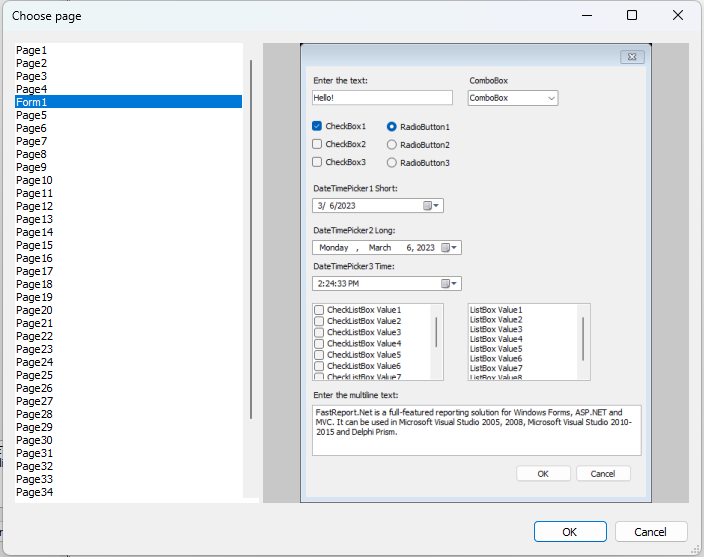
You can add one or more pages or dialog forms to the report. Then you will see the last selected page in the menu area. By clicking on "OK", you will add the selected pages to the main report.
If the name of the page, dialog form, or element names on the selected pages match the existing ones, the new elements will automatically receive new names in the standard format. It is necessary to avoid objects with the same name in the report. This situation can result in many errors.
As a clear example, let’s add Page1 to the main report. This is how it looks in the original report.

After adding the page, its appearance remained the same, but the names of some elements have changed because the main report has elements with similar names. The name of the newly added page has changed by the same principle.

Data sources, Parameters, Variables, Totals, and the script of the report, from which we add the page, are not migrated. Therefore, it may be required to revise the report manually.
It is now easier to work with reports! For any questions, write to our support at support@fast-report.com
