How to export several reports into one PDF file
The theme for this article was one of the questions users of the generator List & Label reporting on the support forum.
As you understand from the question, the user wants to get one PDF file based on several reports.
Unfortunately, a standard solution in L&L is not provided for this case.
Typically, reports are distributed in popular data formats. For example, in PDF, DOC, and XLS. And if you need to transfer a lot of one party reports, we have to make the export of each of them in the desired format. On the other hand, those who receive these files will have to open each and print. Much more convenient it would be to place all of the reports in a single document. This will make sending and printing muhch easier.
Let's look at how you can implement this functionality in FastReport.Net. You need to generate reports from the user application code.
1 2 3 4 5 6 7 8 9 10 11 |
Report report = new Report(); DataSet data = new DataSet(); data.ReadXml("K:/My documents/nwind.xml"); report.RegisterData(data); report.Load("K:/My documents/Master-Detail.frx"); report.Prepare(); report.Load("K:/My documents/Box.frx"); report.Prepare(true); //report.ShowPrepared(); FastReport.Export.Pdf.PDFExport exp = new FastReport.Export.Pdf.PDFExport(); report.Export(exp, "K:/My documents/exp.pdf"); |
The idea is very simple. In one report object, we upload and build a sequence of several reports. As a result, the prepared reports will be saving in the same object, and when we need we can display (ShowPrepared) or just export (Export) them.
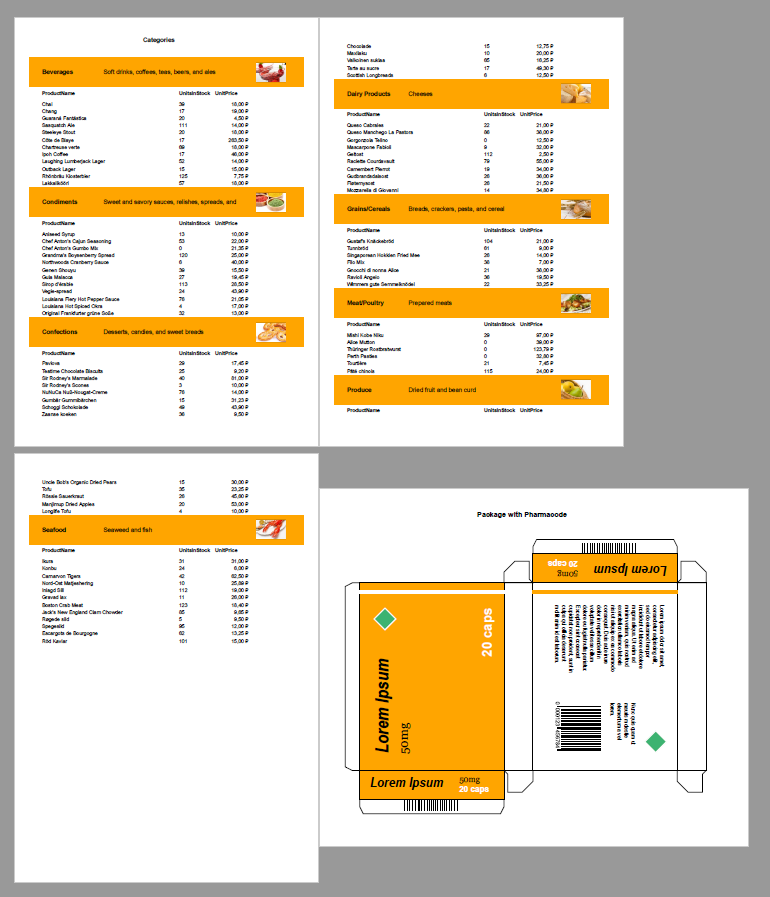
The result is a consistent display of reports in the PDF document:
This way we can create all the reports from the certain folder in a cycle.
