How to make a repeating band
Sometimes it is required to display the same information several times in a report. This may be required in reports that will be printed, for example, invoices, business cards, announcements, invitations, and others.
This was not a trivial task before. You had to use a report script to “multiply” the band. For example, like this:
1 2 3 4 5 6 7 8 9 10 11 12 13 14 15 |
public class ReportScript { int i = 0; int count = 3; private void PageHeader1_AfterPrint(object sender, EventArgs e) { for (int i = 0; i < count - 1 ; i++) Engine.ShowBand(Data1); } private void Data1_BeforePrint(object sender, EventArgs e) { if (i == count) Data1.Visible = false; } } |
Here we had to use two event handlers. First, after showing the header band, that is, before showing the Data band, we needed to generate the required number of data bands. Then, before displaying the Data band, check whether the required number of bands has been reached.
This option is quite workable, but still requires a report developer to have some programming skills and good knowledge of the generator engine to understand how bands will be displayed on the page. All this imposes restrictions on the developer.
From now on, from version 19.3.4, there is a “regular” solution to this issue - the RepeatBandNTimes property for the band. You simply set the desired number of output band instances.
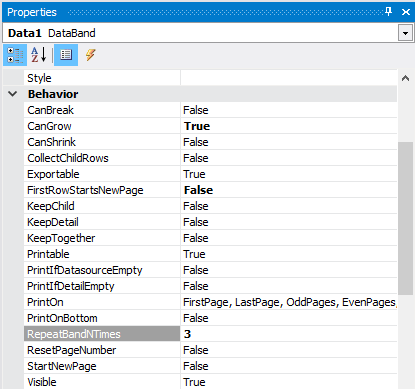
As a result, we get the same result as with the script:

It's nice that the report generator is becoming more and more convenient and does not burden the report designer with unnecessary work.
