How to make lottery tickets by FastReport .NET
Suppose you decided to hold a lottery in the office and you have only FastReport.Net at hand. It is necessary to create two sets of tickets with unique numbers. The first set for users, the second for the lottery.
We will generate unique numbers for the lottery in the report script and use them as data sources. Let's get started.
Run the report designer. Now we do not have data for the report yet. Go to the Code tab (Code).
I made the list of numbers global:
1 |
private List<int> num = new List<int>();
|
We create a method for generating unique numbers:
1 2 3 4 5 6 7 8 9 10 11 12 13 14 |
private void RandomShaffle() { const int n = 20; // A series of 20 tickets Random r = new Random(10); int curnumber = 0; for(int i = 0; i < n ; i ++) { curnumber = r.Next(100000, 999999); // Generate a number in a given range if (!num.Contains(curnumber)) // Check the list of numbers for a match with the current one num.Add(curnumber); // Add to list else i--; // We roll back the iteration backward } } |
We specify the number of tickets n in the party. And also, the range in which to generate a number. I want six-digit numbers, so I specified a range from 100000 to 999999.
Now, select the Report object in the Property inspector:
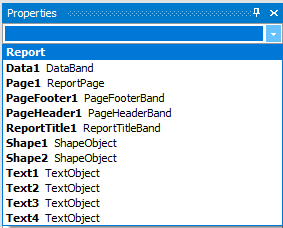
For it, we create a ReportStart event:
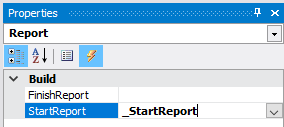
In the event handler, we generate a list of numbers and register it in the report as a data source.
1 2 3 4 5 |
private void _StartReport(object sender, EventArgs e) { RandomShaffle(); Report.RegisterData(num, "Numbers"); } |
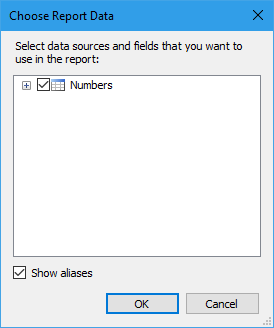
It's time to create a report template. Now the report still does not know anything about the data source that we are preparing for it. Let's run the report for execution as is. Of course, we will get an empty page. Go back to editing the page. Now we can select the data source:
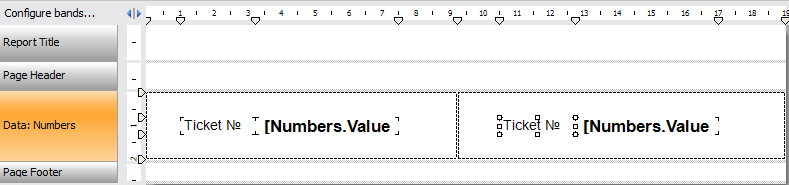
Create a simple template with two tickets on the data band:
Run the report: 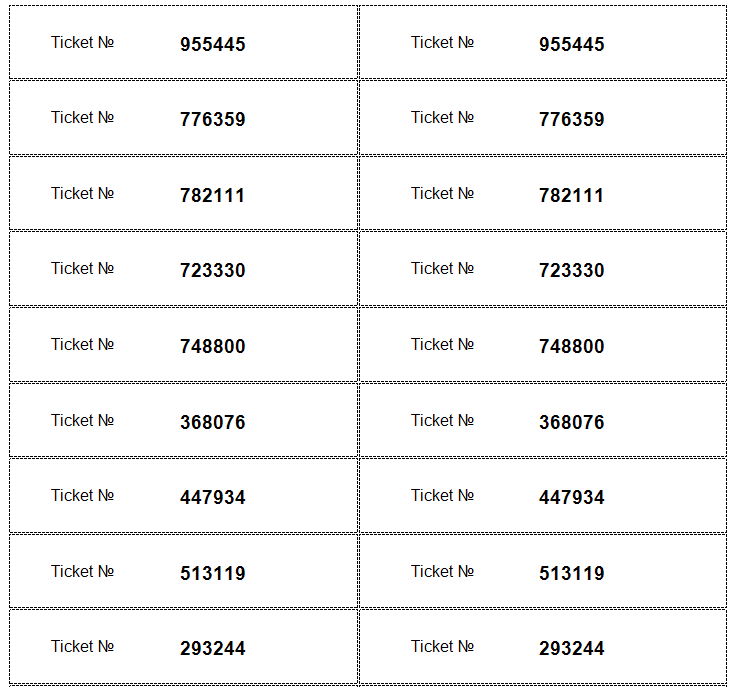
And see the list of tickets. It remains to print them and cut them.
