How to display the footer page PageFooter only on the last page of the report
When you develop the same reports, or reports with the same bands, you can use the inheritance of reports. That is a basic report that will be used as a basis for others. This will provide a uniform component to the set of reports you create.
Just working with such a set of identical reports, the user of the Combit reports generator
List and Label ran into a problem. Namely:
"I have a project template that has some standard text" page title ", which should be printed on each page, and then" page footer ", which should be printed on the last page. All of them are static elements (with no reports of the container).
But when I turn on the project template, I cannot get the "Footer" only printed on the last page. If I set the condition for LastPage (), it is not printed at all. It is expected according to the documentation
...
Now I just save the footer text in variables, and then place it in every project that is tedious and error-prone. "
Unfortunately, the developers did not find an easy solution to this issue. The user will have to put the LastPage() property for the footer of the page in each report.
FastReport.Net also allows you to use a basic template to create a variety of similar reports. Let's look at how we would solve the problem using the FastReport report generator.
In fact, it's very simple. In the basic report template (from which you inherit) you need to set the PrintOn property for the PageFooter band. It's a checkbox list. You must choose LastPages and OddPages.
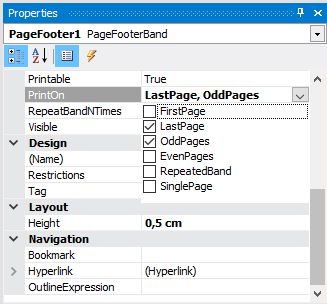
Only with this combination will you make the footer of the page appear only on the last page of the report: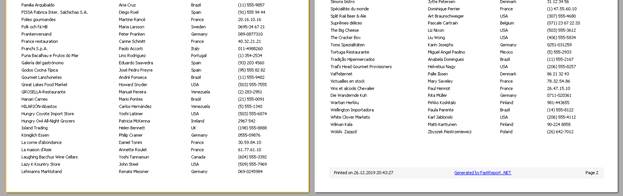
So, you can avoid editing all reports that are based on a basic template.
