How to filter the built matrix
In FastReport, the Matrix object allows us to filter data. This is one of the most popular functionalities and many users like to use it. However, sometimes filtering the original data is not an option.
Let's take a look at the matrix below.

As you can see, these are sales statistics by employees for 5 years. There are no statistics for Steven Buchanan employee for 2011, 2012 and 2015. This means that Steven will disappear from the matrix if we filter the matrix by year and count out 2013 and 2014.
To complete the picture, you need to count all employees, even if they did not have sales for the reporting period. In this case, you will have to use one of the options:
1) to artificially enrich the raw data with zero values for each year in which the employee had no sales;
2) to filter the already built matrix by removing unnecessary columns.
In the report template:
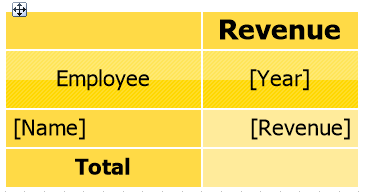
Let’s add the BeforePrint event for the Year cell:
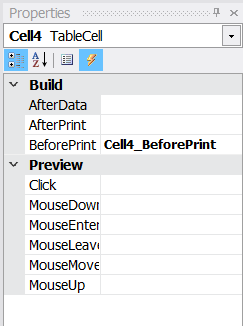
With the following code:
Here we have set the indexes of the columns we want to delete. Now we will create a ModifyResult event handler for the matrix to edit the already built “matrix” object:
 private void Matrix1_ModifyResult(object sender, EventArgs e)
 {
 removeColumns.Reverse();
 foreach (int del in removeColumns)
 {
 Matrix1.ResultTable.Columns.RemoveAt(del);
 }
 }
You need to delete from the end — from the largest index, because when deleting columns or rows, the index of all subsequent ones is shifted. Therefore, the list of indexes for deletion was built in reverse order using the Reverse () method. Next, we simply deleted the columns for the corresponding indices. Let's see what we have in the end:

The columns for 2013 and 2014 disappeared from the matrix, but employee Steven Buchanan remained. We have the desired effect! You can also delete rows you don't need using another collection Matrix1.ResultTable.Rows. Now you know how to filter a matrix when data filtering is not an option.
