Encryption reports in FastReport .NET
Reports encryption is a very useful option. In many enterprises, security policy provides for encryption of documents by transfer on external network. Of course, there is plenty of software to encrypt, but FastReport.Net allows you to do this by their own means. For the reports encryption it uses the AES algorithm that provides a high degree of protection.
Encrypt the report in FastReport.Net presents no difficulties. Suffice it to set a password. Let's take a closer look:
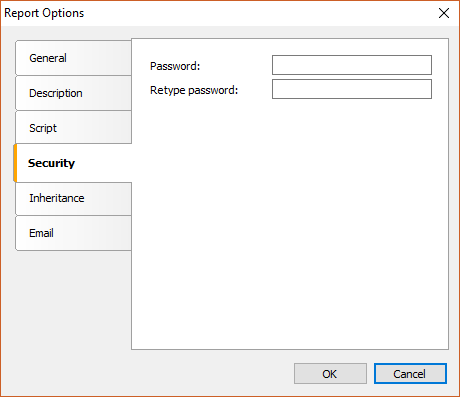
- Create a report;
- Open the properties of the report in the menu Report -> Options. "Security" tab.
As you can see, you can only set the password of the report. By setting the password of the report, we will automatically enable its encryption. Now, no one can open it without knowing the password.
- Set a password for the report.
- Save the report.
- Now try to open it in the designer. And we get a dialog box:
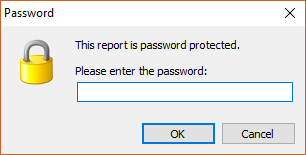
You can open the report file if you know the password only.
Unfortunately, encrypted reports are not yet available for the web. Therefore, the scope of these reports is limited. As mentioned earlier, the encryption can be used to exchange report files within the enterprise, or when working with customers.
