How to connect to RavenDB
Recently, the NoSQL database is gaining more and more popularity. They differ favourably from conventional relational databases and provide the following: high resilience, incredibly large amounts of data, good scalability, clustering.
One of the new NoSQL databases is RavenDB. This is a document-oriented database, like the popular MongoDB. But compared to the last, RavenDB is an open source database. This means you can use it in your apps for free and add functionality according to your wish.
Let's look at the way to connect the RavenDB database in your report. To do this, you need to use a plug-in connector from the supply of Fastreport.Net, which is located in the catalog of the installed program in the folder Extras\Connections\FastReport.RavenDB. We are compiling this project.
Now we move to the report designer and add a plug-in to the File->Options menu.
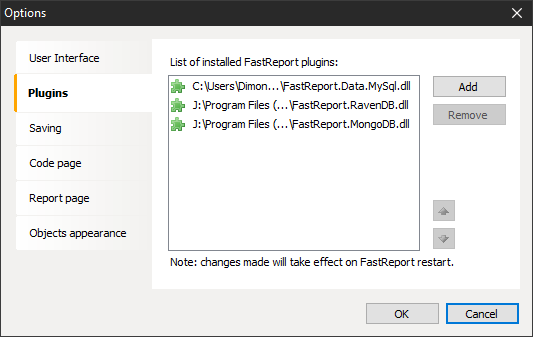
Once you've added fastReport.RavenDB.dll to the plugins, you need to reboot the designer and start building a connection.
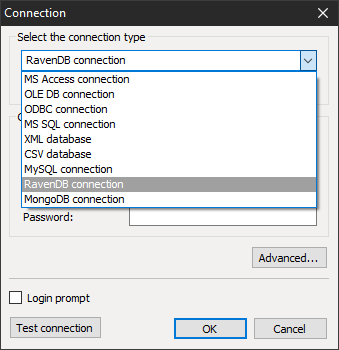
In the list of available connections you can find new connector RavenDB.
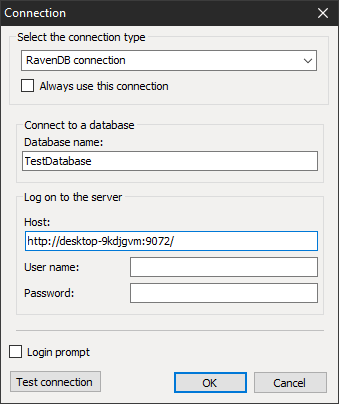
Depending on your database settings, the connection may be secure or unprotected. In the first case, you need to enter the username and password.
Your database may be on a remote server or on a local computer, does not matter. We only specify the host URL and the name of the base. As a result, an unsecured connection line will look like this:
Url = http://desktop-9kdjgvm:9072/;Database=TestDatabase
Next, as usual let’s move to the table selection:
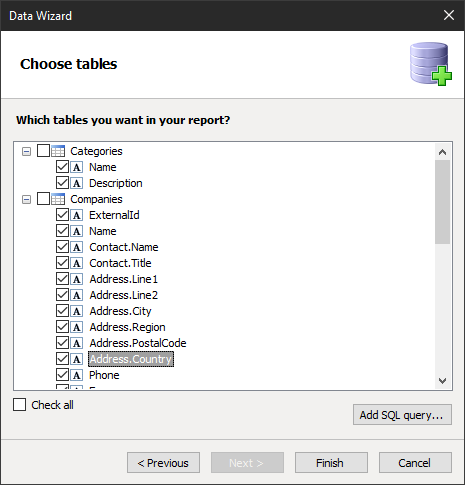
Unfortunately, we cannot use SQL queries editor. Although NoSQL provides the ability to write SQL alike queries, yet query building wizard cannot work with them. Therefore, parameterized queries, are also not available for us.
Please note that the essence of Companies has different subordinate entities that already have final data fields. This is specificity of document-oriented NoSQL databases, which have a hierarchy of data. Most often they use json-like documents that allows you to create a hierarchical design data shown in the figure above.
