How to connect to MongoDB from the FastReport .NET report
First of all, you need to assemble a plug-in connector library to the database for the reporting designer. It is located in a folder:
C:\Program Files (x86)\FastReports\FastReport.Net\Extras\Connections\FastReport.MongoDB
Open the project, restore NuGet packets and reassemble it.
As a result, in the Release folder you get FastReport.MongoDB.dll library.
Now, in the report designer, you can add a plug-in to the menu File-> Options:
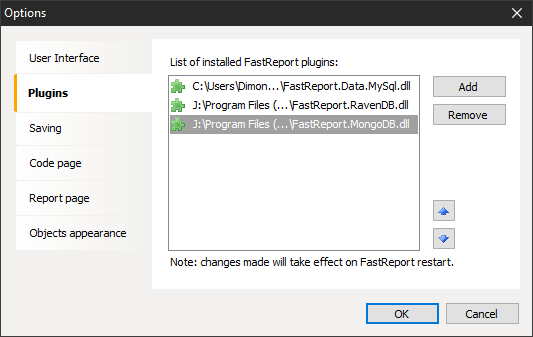
Once you've added a plug-in this way you need to restart the report designer.
Now let’s move to creating a data source. In the wizard of creating a new connection, we can choose an available connector:
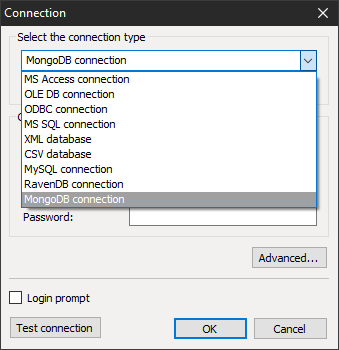
The MongoBD connector appeared on this list after adding a plug-in to the designer. Now that we've selected a connector, we need to set up a connection:
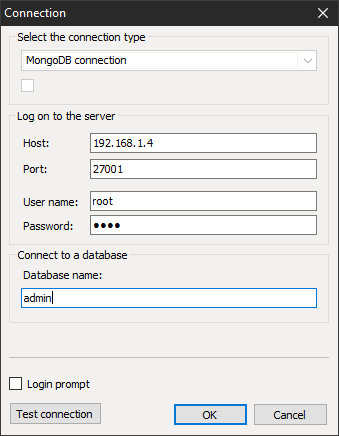
The local or remote server acts as a host. After successfully connecting to the database, you need to select tables:
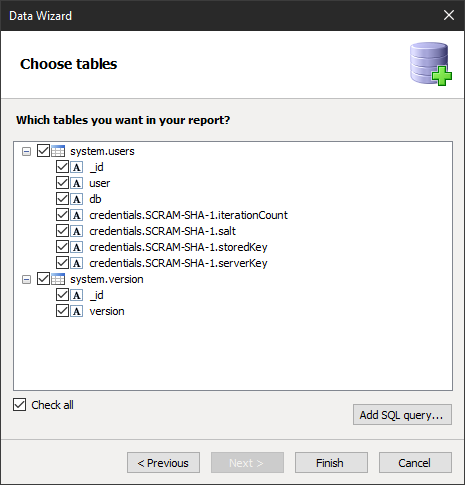
Here the tables are presented in the usual form for the user relational database. In fact, you can see a hierarchical structure. For example system.users table has a column credentials, which in turn is a table.
Since this is not a SQL database, SQL Editor queries is not available to us. So we cannot filter data at the stage of their preparation.
