How to combine multiple reports into PDF file in Delphi
It is often necessary to combine several documents into one (for example, PDF). It could be several chapters of documentation, catalog directories etc. Strictly speaking, this sometimes needs to be done not only for PDF, it’s just that this file format itself does not imply editing and “merging” without special tools, so it would be better to do it correctly right away.
Today I will tell you how to do this in FastReport VCL and FMX. In our case, there will be several reports at the input and one file at the output.
So, I suppose we already have a project using FastReport and the templates are prepared. In our example, these are files on the local storage but nothing prevents from taking them from the database or some other sources. Now we need to combine two (or more) reports into one large file.
For this, FastReport has tools that allow us to attach a new report in addition to the existing one. The TfrxReport.PrepareReport method has one optional ClearLastReport: Boolean parameter which is set True by default. This parameter determines whether the pages of the previously built report should be cleared. The following example shows how to build a package of two reports:
| Pascal: | |
1 2 3 4 5 |
frxReport1.LoadFromFile('1.fr3'); frxReport1.PrepareReport; frxReport1.LoadFromFile('2.fr3'); frxReport1.PrepareReport(False); frxReport1.ShowPreparedReport; |
| C++: | |
1 2 3 4 5 |
frxReport1->LoadFromFile("1.fr3"); frxReport1->PrepareReport(true); frxReport1->LoadFromFile("2.fr3"); frxReport1->PrepareReport(false); frxReport1->ShowPreparedReport(); |
Load the first report and build it without displaying it on the screen. Then load the second report into the same TfrxReport object and build it with the ClearLastReport = False parameter. This adds the second report to the previous one.
Obviously, we can repeat the two penultimate lines to add some more reports to our complex composite report. And this part is only possible from the code.
When we have built everything, we can see the combined reports in the preview window and easily save this file in any format and location from it.
Saving the combined report as PDF.
After we managed to combine two reports into one we simply export it to PDF (or, in fact, to any file format – for example, RTF/DOC/ODT or tabular – but it is not so difficult to combine them after export while it is relevant for PDF). Here you can let the user select the file format for saving and settings:
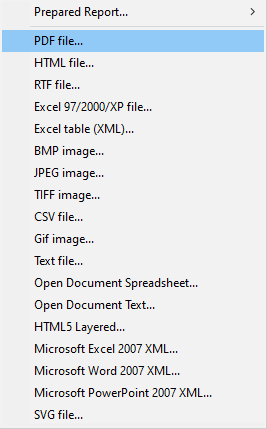 Click on the Save icon in the preview.
Select the required format – PDF.
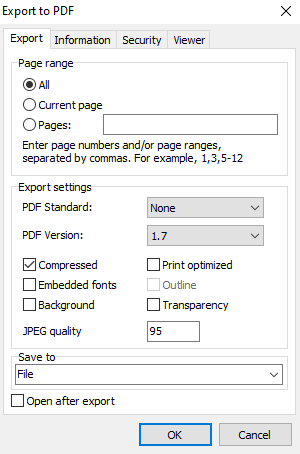
We can see the Export settings window.
Configure everything that we need.
For more information about creating and configuring, see the article:
Click OK when finished!
Or something like that "FrxReport1.Export (frxPDFExport1);"
I described the parameters of saving in various formats from the Delphi, Lazarus, and C ++ Builder code in more detail in previous articles.
We can open the resulting document after creation. Having opened the file, we will see a consistent display of our reports in one PDF document.
Combining two PDF reports from Delphi, Lazarus, and C++ Builder is not as difficult as it might seem.
