How to work with ClickHouse in FastReport Cloud

2023-11-20

ClickHouse is a popular database that is convenient for data analysis. In this article, you will learn how to connect to this database from the FastReport Cloud service for report generation and storage.

As an example, the article will use a database of tutorials on working with ClickHouse.

Database screenshot


In our case, “default” is the name of the database, and “my first table” is the name of the table. To add our database as a data source, select “ClickHouse” when adding a source. You will see the dialog:

Adding ClickHouse connection


We don’t need the table name now, just the database name. So, let’s fill out the form:

Completed form for adding a connection


As you can see from the dialog, the connection test was successful. Now just click “Connect,” and the connection will be saved among the existing ones.

Connecting to ClickHouse in the data sources menu


You can then use this connection in your reports. Now let’s try to make a simple report based on this connection:

Online designer with an open report


And, of course, take a look at the report preview:
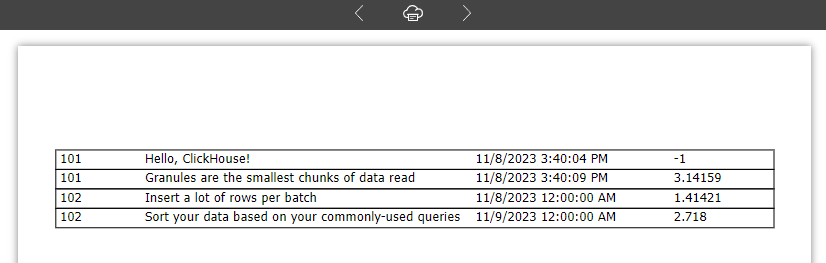
Preview of the report with ClickHouse data


If we compare the data from the original table with our report, it will be quite obvious that the connection is functioning properly.

FastReport Cloud Data Source
21 Eylül 2026, Pazartesi

FastReport .NET için Bir AI Aracısını Yapılandırma: Mimari, Sınırlamalar ve Rapor Taşıma

FastReport .NET için yapay zeka özelliği: Crystal Reports ve StimulSoft’tan raporların otomatik olarak taşınması, .NET 8/9 için yeniden düzenleme, şablon oluşturma ve veri sızıntılarına karşı koruma.
8 Eylül 2026, Salı

FP3 Formatı ile ilgili Sıkça Sorulan Soruların Cevapları

FP3 formatıyla ilgili 11 yaygın soruyu inceleyeceğiz: bu dosyaların ne olduğu, FR3 dosyalarından nasıl farklı oldukları, hangi programların bunları açabileceği ve PDF'ye nasıl dönüştürüleceği.
4 Eylül 2026, Cuma

FastReport .NET'ten bir raporu DXF formatına nasıl aktarabilirim?

Bu makalede, bir raporu DXF formatına aktarma yöntemlerini inceleyeceğiz ve ayrıca dosya bir CAD uygulamasında açıldıktan sonra elde edilen çıktının nasıl göründüğünü göreceğiz.

© 1998-2026 Fast Reports Inc.