Advices accelerating report creation
Today I would like to talk about some of the techniques to accelerate the development of the report. We are all accustomed to the drag & drop technology. Most often in such a way, the developers adds controls and field from the tables to the reports page. But you forget that you can drag more than one object, but several.
For example, the fields of the table. Click on the desired field, and then, holding the Ctrl key mark the other. As a result, you have a few selected data fields. Now you can drag them pulling any of the selected fields.
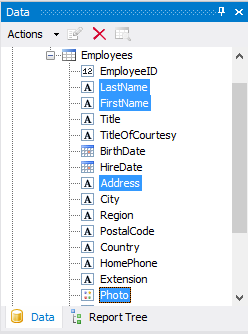
Also, instead of Ctrl, you can use the Shift key. This selects all elements located between the first marked field and second.
Considered way for adding data to a report page is actual for any element from the "Data" window: the data, functions, variables, results.
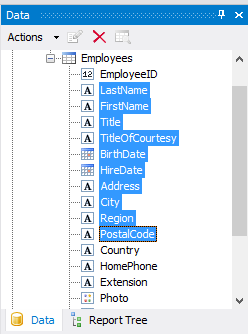
For example, let's drag and drop some fields from the table Emploee to the "Data" band:
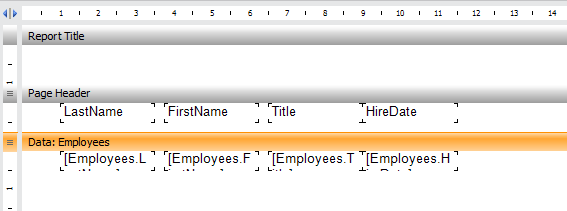
And now. Add a dialog form into the report . You can rapidly create filters on the fields of the table. For this "drag" on the shape of the field from the data tree. For example HireDate.
We got control DateTimePeacker related with field HireDate. Now the data will be automatically filtered for the selected date. We add in the same way another filter - the field FirstName:
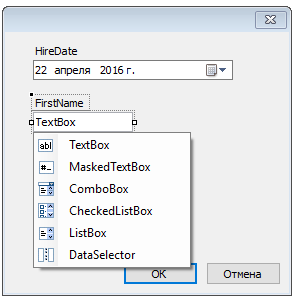
In this case, we can choose the type of the added components:
• TextBox;
• MaskedTextBox;
• ComboBox;
• CheckedListBox;
• ListBox;
• DataSelector.
Any of these components can perform a role of a filter. You can enter the name manually in the TextBox. Or choose from a drop-down list. A DataSelector or CheckedListBox allow to select multiple names. By the way, if you change the ListBox SelectionMode property to MultiSimple, it is also possible to select multiple items to filter.
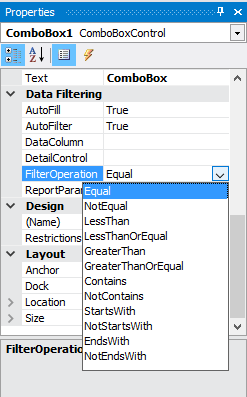
Added filter can be changed to suit your needs. FilterOperation field allows you to select the type of filtering. It can be full compliance with the selected item from the list, or do not match, and others.
These simple tips can help you to speed up work on the creation of reports, as well as a simplified manual labor.
