Other settings
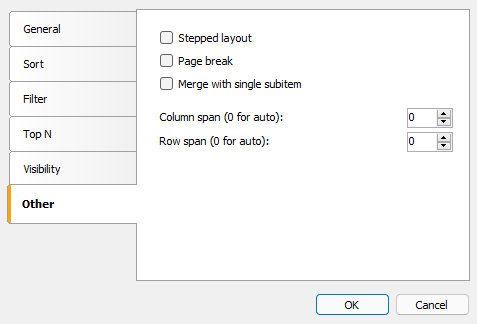
Other settings can be found on the "Other" tab of the header editor:
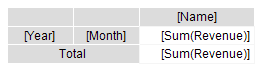
The "Stepped layout" option toggles the layout of nested elements between block (default) and stepped layout. Let's look at the example of a matrix with a nested row header (Year, Month). The block layout looks like this:
The finished report looks like this:
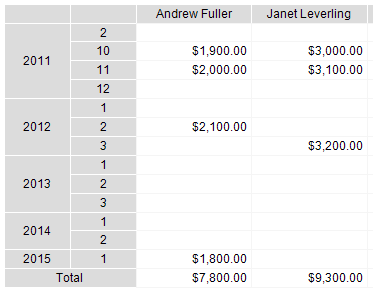
If you enable the "Stepped layout" option for the "Year" element, the arrangement of the elements will change as follows:
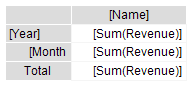
The finished report looks like this:
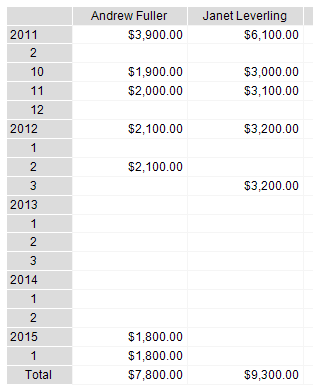
When you enable the "Stepped layout" option, the nested element changes the Property
Padding.Left, which is responsible for text indentation. You can adjust this value in the Properties window.This option can be used for any element that has nested elements.
The "Page Break" option inserts a new page before printing the element. No new page is inserted before the first element.
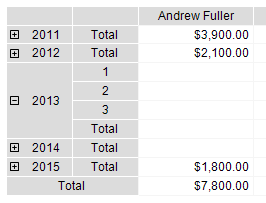
The option "Merge with a single subitem" is used in the case of dynamically collapsed headers (see section Collapsing/expanding elements). The option allows you to hide the "Total" element. Below is the view of the finished report with the disabled option (by default).
and with enabled, pay attention to the output of the "Year" element:
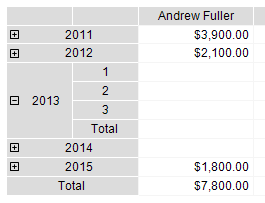
"Column span" and "Row span" options allow you to merge cells in columns and rows when element is printed. By default, the element controls these parameters automatically.