Data band columns
Another method of printing a multicolumn report is based on using the "Data" band columns. The rest of the bands continue to be printed in one column.
Column parameters can be configured using the "Columns" property, which can be changed in the "Properties" window. You can set up the following parameters:
- number of columns;
- column width;
- column printing mode. You can select either of the two modes - "AcrossThenDown" and "DownThenAcross";
- the minimum number of rows in one column, if the chosen mode is "DownThenAcross".
Column band can be printed in either of the two modes. In the "AcrossThenDown" mode (the default one), columns are printed in the following way:
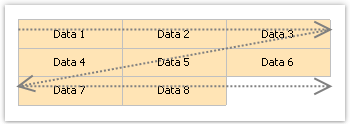
In the "DownThenAcross" mode, column printing occurs in the following way:
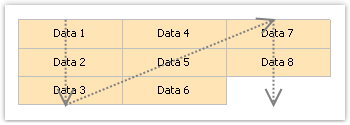
In this mode, FastReport calculates the number of data rows in a column in such a way that, columns are filled equally. You can also set the minimum number of rows in a column with the "Columns.MinRowCount" property.