Exports supported by the VCL backend
When the online designer is paired with a FastReport VCL backend (web report), the prepared report can be saved in any of the formats listed below. The export itself runs on the backend — the designer only triggers it and then downloads the resulting file — so the set of available formats is determined by the capabilities of the VCL web report, not of the designer's UI.
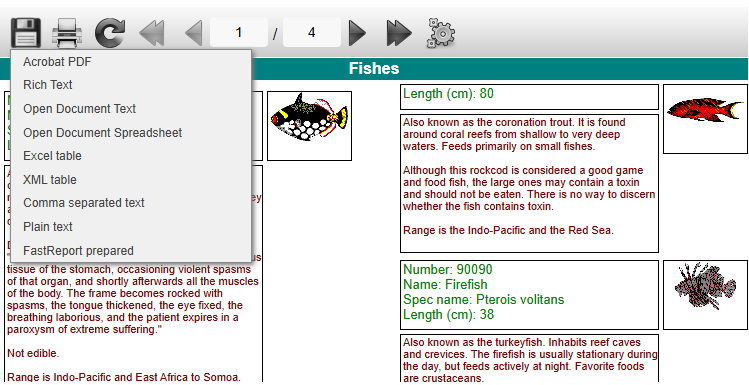
To export a report, run it in preview mode, hover over the floppy icon on the toolbar and pick a format from the drop-down list:
Available formats
The VCL web report exposes the following items in the export menu:
- Prepared report — FastReport's native binary container (FP3). Stores the fully rendered pages so they can later be printed or re-exported from a desktop FastReport VCL application.
- Export to PDF — Adobe Acrobat document, the most universal format for distribution and printing.
- Export to RTF — Rich Text document, compatible with practically any modern text editor.
- Export to Open Document Text — OpenDocument text document (ODT).
- Export to Open Document Spreadsheet — OpenDocument spreadsheet (ODS).
- Export to Excel — Microsoft Excel binary spreadsheet (XLS, Excel 97/2000/XP).
- Export to Excel (XML) — Microsoft Excel XML Spreadsheet (Excel 2003+ XML).
- Export to CSV — Comma-Separated Values file for raw data exchange.
- Export to TXT — plain-text output without any layout/graphics.
Each format is produced by its own VCL exporter, which internally uses one of three rendering modes — layered, tabular or drawing — fixed for that format. The page describing each format mentions which mode is used; from the online designer's perspective the choice is not configurable and only affects what the resulting file looks like.