Band settings
To add a band to the report page, click the tab "Bands". Select the required band and click on it.
To add the "Data Header" or "Data Footer" you should pre-select the Data band on the report page.
To add another band "Data" you can choose any of the bands on the report page except the already existing band "Data". Then add the band "Data" by using the icon on the toolbar. If you select Data band on the report page and add another Data band, the detailed "Data" band will be added. There is another way to add a detailed band "Data". Call the context menu for the "Data" band by the right mouse click. Then click the "Add Detail Data Band" menu item. In addition, from this menu you can add a child band.
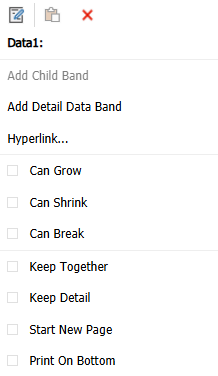
You can delete the selected band by using a context menu or pressing the Delete key. FastReport will limit your actions which could lead to the creation of an incorrect report template. For example, if you have a band “Group Header”, you can't delete the "Data" band from this group. First you have to remove the group. Also, when you delete some of the bands, they will be deleted along with their associated bands. For example, if you delete the "Data" band its header, footer, child band and detail band will be removed too.