Sorting values
Rows and columns by default are arranged in ascending order, either numerically or alphabetically depending on the type of the data. Sort modes can be set independently for rows and columns. The sort modes are :
- ascending
- descending
- no sort. With no sorting the rows/columns are displayed in default database order.
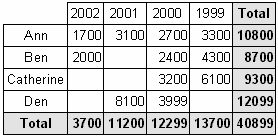
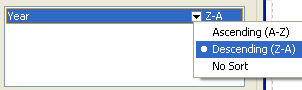
Let's change the column sorting in our example. Let the years be arranged in decreasing order. To do this, open the cross-tab editor, select the “Year” column element and change the sorting mode by clicking on the down arrow and selecting Descending:
Close the editor and preview the report. It will look like this: