Using .NET objects
In a script, you can use any .NET objects, which are defined in the following assemblies:
System.dll
System.Drawing.dll
System.Windows.Forms.dll
System.Data.dll
System.Xml.dll
Apart from that, you can use any object, defined in the FastReport assembly. If you need access to another assembly, add it to the list of assemblies. This can be done in the "Report|Options..." menu, by choosing the "Script" tab:
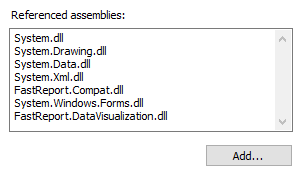
For example, if you want to use a function in your report which was declared in your application, add application assembly (.exe or .dll) in a report assemblies list. After that you can call the function by using namespace of your application. For example, if the following function is defined in application:
namespace Demo
{
  public static class MyFunctions
  {
    public static string Func1()
    {
      return"Hello!";
    }
  }
}
Calling it in the script can be done in the following way:
string hello = Demo.MyFunctions.Func1();
If you add the using Demo line at the top of the report's script, it will allows you to shorten the syntax:
string hello = MyFunctions.Func1();