The "Zip Code" object
The "Zip Code" object allows to print a zip code on envelopes. It may display numeric characters (0-9).
The object is as follows:
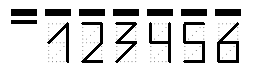
You can connect an object to data by using one of the following methods:
- set the zipcode data in the
Textproperty; - bind the object to a data column using the
DataColumnproperty; - set the expression that returns the zipcode data in the
Expressionproperty.
The "Zip Code" object has the following properties:
| Property | Description |
|---|---|
| SegmentCount | The number of segments in a code. This property is set to 6 by default. |
| SegmentWidth, SegmentHeight | The size of a single code segment. The default size is 0.5х1cm. |
| Spacing | This property determines a distance between two segment's origins. The default value is 0.9cm. |
| ShowGrid | Determines whether it is necessary to display a grid. |
| ShowMarkers | Determines whether it is necessary to display the markers (bold horizontal lines above the zipcode). |
| DataColumn | The data column which this object is bound to. |
| Expression | The expression that returns the zipcode data. |
| Text | The text containing a zipcode. |