Example 2. Ask for a text from the user
In this example, we will create a dialogue, which will be asking for an arbitrary text from the user and later print the entered value in the report.
Create a new report and add a dialogue into it. On the dialogue, place LabelControl and TextBoxControl controls:
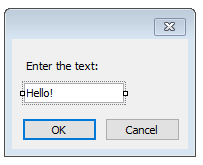
In the given case, the value we have entered is contained in the Text property of the TextBoxControl. In order to print this value in the report, add a new "Text" object on the "Report Title" band and write the following in it:
You have entered: [TextBox1.Text]
where TextBox1 is a name of the TextBoxControl control.