Styling the matrix
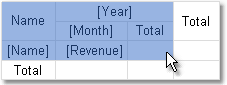
In order to change the appearance of a matrix cell, click on the needed cell. With the help of the toolbar you can set up the font, border and fill. In order to change the appearance of several cells at once, select the group of cells. To do this, select the top left cell, and, without leaving the mouse, move the mouse so as to select the group:
You can use styles in order to change the appearance of the whole matrix. To do this, invoke the context menu of the "Matrix" object and choose the style: