FastReport Cloud, FastReport Corporate Server, FastReport Publisher 2023.1
Folder export
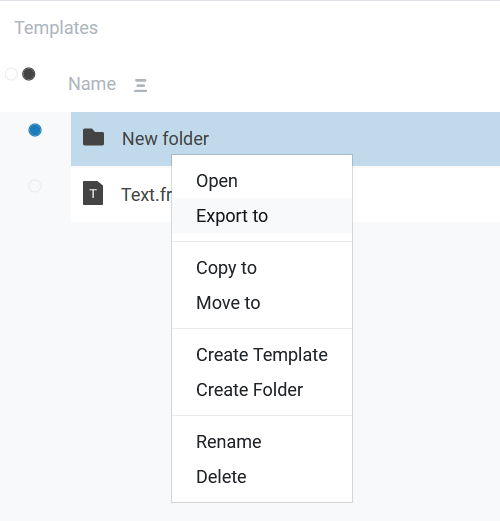
We have added the ability to export a folder with templates or reports completely. The structure of all nested folders is preserved. To do this, just right-click on the folder (or long tap) and select export from the menu.
Bug fixing
In this version, we have worked on quality and fixed many bugs, improved localization, and icons.
Full list of changes:
Version 2023.1 - 1/11/2023
---------------
[Backend]
+ added a new AdminAction field for all types of audits
+ added a new entity type - contacts
*  now when previewing, the .preview folder will be cleared if necessary
*  improved file sorting performance
-  now when creating and moving files to the recycle bin, error notifications appear
-  fixed a bug where a user could create an expired workspace
-  copying a folder did not copy the contents
-  fixed a bug where all entities created by anonymous users were fully accessible to all users

[Common]
+ added information about the 2022.3 release
+ added folder export
+ added the messageId field and related audits to the Audit Details page for tasks
+ added the messageId field to all task audits
*  now some fields cannot be null when creating and updating a user
*  disabled user and subscription deletion when the server is not in corporate mode
-  the user creation and update pages now show error warnings

[Frontend]
+ added the Name field when creating a data source
+ added the missing fields to the Audit Details page
+ added a new icon with bold edges
+ added a dialog for agreeing to the license agreement
+ added search to the Workspaces page in the admin panel
+ added recycle bin actions to document permissions
+ added Russian translation of file statuses and sizes
*  pinned the search string to the top of the screen on the file pages
*  replaced identifiers with names in the admin panel bread crumbs
*  changed the export error message to a more informative one
*  fixed the sorting buttons on the screen
- now the subscription storage capacity on the "Workspace Information" page is updated after switching tabs
- fixed redirect to the outdated page when the group limit is exceeded
- fixed an error related to anonymous users — the error about lack of permissions is now hidden in the console
- fixed an error related to anonymous users — getting the root folder without an id when exporting
- fixed the checkboxes on the Edit Plan page in the admin panel
- fixed the export from the File Properties page for anonymous users
- fixed the available space values in the Workspace Plan card
- fixed the overflowing Owner field in the File Information
- replaced "Export Folder" with "Report" on the report rights editing page
- fixed the incorrect width of the file cover in the File Information window
- the Workspace Information page did not update the content when switching workspaces
- fixed an error where the admin panel sidebar menu did not redirect to the right page
- it was possible to create multiple modal windows on top of each other, which caused visual errors